Assigning Topic Experts
This section provides an overview of assigning topic experts and discusses how to assign topic experts (also known as content managers) to template pagelet publications.
|
Page Name |
Definition Name |
Usage |
|---|---|---|
|
Related Information Topic Experts Page |
EPPRC_USER |
Assign topic experts to each menu item and Related Information template pagelet combination. See Assigning Topic Experts to Page-Pagelet Combinations Page. |
|
Related Contacts Topic Experts Page |
EPPRC_USER |
Assign topic experts to each menu item and Related Contacts template pagelet combination. See Assigning Topic Experts to Page-Pagelet Combinations Page. |
|
Related Resources Topic Experts Page |
EPPRC_USER |
Assign topic experts to each menu item and Related Resources template pagelet combination. See Assigning Topic Experts to Page-Pagelet Combinations Page. |
Content displayed within a template pagelet is regulated and maintained according to the menu item. Topic experts are subject matter experts who are authorized to add, edit, or expire content for specific menu item–template pagelet combinations.
Topic experts enable the portal administrator to delegate the administration of Context Manager content to the person who is most knowledgeable about that topic. For example, the business process expert for the Human Resources Report Time Off transaction could be the topic expert for the Related Information publications that are assigned to the Report Time Off menu item.
If the expertise is shared among several people, different publications can be assigned different topic experts for a menu item. For example, if one person manages the external vendor relationships for a menu item and someone else manages the internal representatives, you could create two publications of the Related Contacts pagelet, each with its own topic experts.
Assign topic experts to all menu item and template pagelet combinations for Related Information, Related Contacts, and Related Resources.
Access one of the following pages:
Related Contacts Topic Experts page (Portal Administration, Context, Related Contacts, Define Topic Experts).
Related Information Topic Experts page (Portal Administration, Context, Related Information, Define Topic Experts).
Related Resources Topic Experts page (Portal Administration, Context, Related Information, Define Topic Experts).
This example illustrates the fields and controls on the Related Information Topic Experts page. You can find definitions for the fields and controls later on this page.
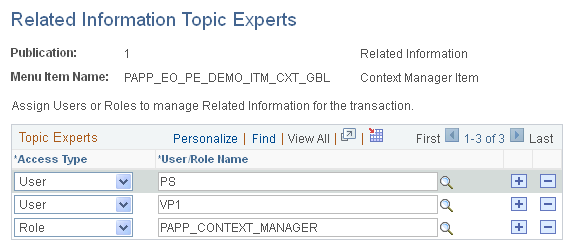
The Related Contacts Topic Experts page, Related Information Topic Experts page, and Related Resources Topic Experts page all display the following page elements.
Field or Control |
Description |
|---|---|
Publication and Menu Item Name |
Displays the template pagelet–menu item combination for which you are defining topic experts. |
Access Type |
Select User to be able to select the user ID of the topic expert in the User/Role Name field. Select Role to be able to select the role of the topic expert in the User/Role Name field. |
User/Role Name |
Select the user ID or role name for the topic expert. |